Welcome to Muky, the iPhone/iPad app for creating and managing parent-controlled music playlists with Apple Music, Spotify, or local files on your device. Enjoy sync, offline support, and a focused, distraction-free audio experience for your kids.
Works with your favorite music services
Local FilesMP3, WAV etc.
Lightweight and User-Friendly
Kid-Friendly Audio Player
A smart, user-friendly audio player designed for kids. Features enhanced playback controls with shuffle mode, AirPlay support, progress bar with scrubbing controls (can be enabled in settings) for precise playback control, auto-stop timer perfect for bedtime stories, and Freeze Dance button for musical games. New in 5.0.0: skip control lets you block skipping or unlock it after a set time, per profile or playlist. Offline playback is included for everyone. Choose between cover grid, scrollable track list with title, artist and duration, or both views with a toggle. The cover list automatically groups albums, shows track counts, and follows the current track with animated indicators. New in 5.1.0: when the auto-stop timer runs out, give 5 or 10 more minutes or a custom time instead of leaving the player.
Now with CarPlay
Your Kids' Music on the Road
Muky works with your car's built-in display. Browse playlists, switch between kid profiles, and control playback - all without touching your phone. The app remembers exactly where you left off, so audiobooks and playlists resume seamlessly.
Create and Sync Playlists
Custom Playlists for Kids
Create custom playlists with your choice of songs, albums, or audiobooks. Sync content from Apple Music or Spotify playlists with one tap and save them for offline use. With multiple profiles, each child gets their own playlists and settings. Move playlists between profiles anytime. Enhanced playlist management now includes sorting and shuffling options for both playlists and individual tracks. Customize each playlist with your own images, emojis, or pick cover artwork directly from your tracks. The enhanced drag & drop interface makes organizing music effortless. New in 5.0.0: share songs, albums and playlists from Apple Music or Spotify straight into Muky, hide a playlist in the player without deleting it, and see what your kids listened to in the on-device listening history.
Share Instantly
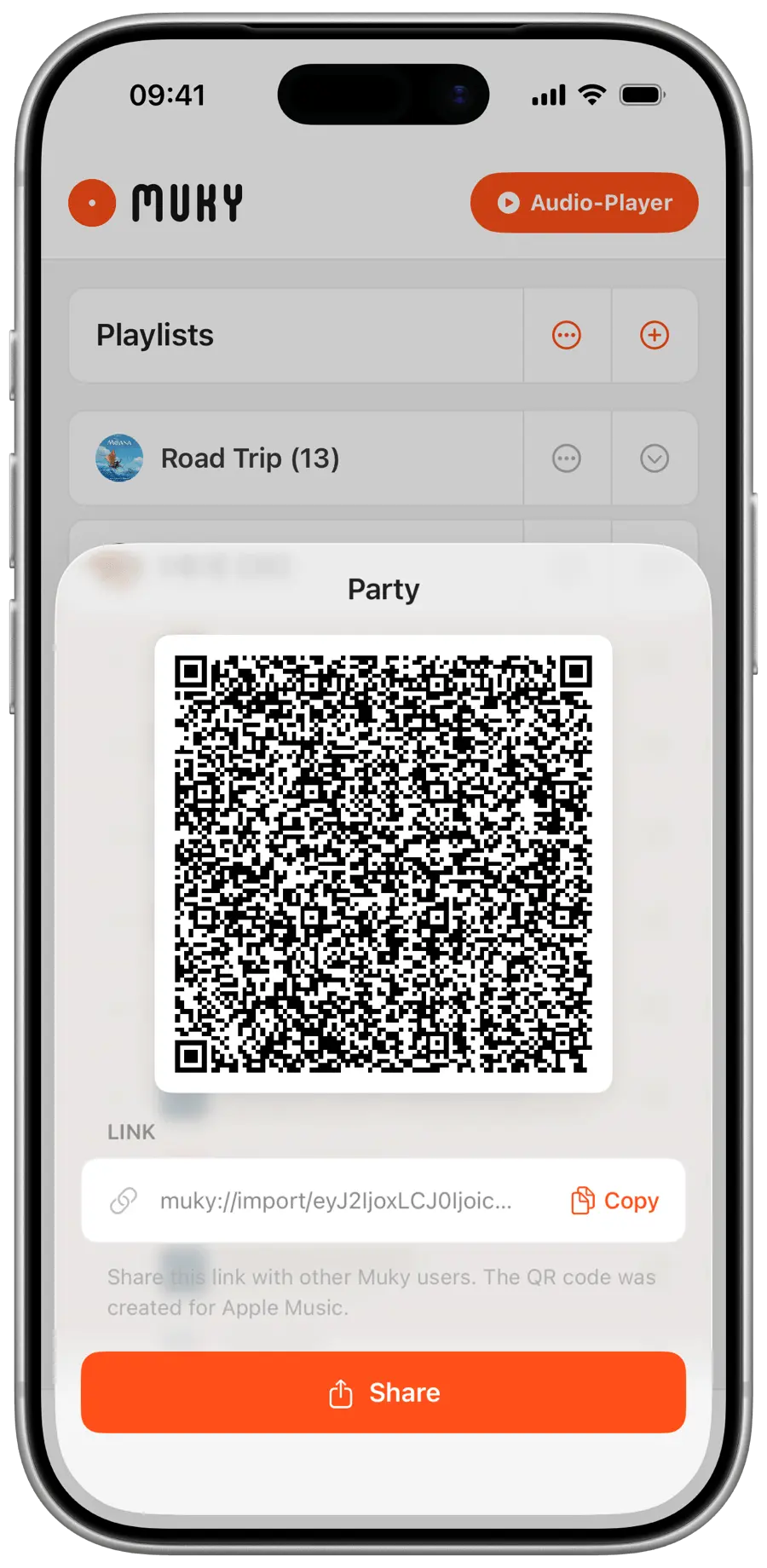
QR Code Playlist Sharing
Share playlists with family and friends in seconds. Generate a QR code for any playlist and let others scan it to import directly into their Muky app. Perfect for sharing audiobooks between family devices or swapping favorite music with friends. No complicated setup required – just scan and enjoy.
Discover New Content
Curated Albums & Audiobooks
Explore hand-picked albums and audiobooks perfect for kids on the redesigned Browse home: a featured stage with rotating highlights, themed collections to swipe through, and a searchable album grid with sorting. Preview tracks before adding them and import entire albums with one tap. Regularly updated with fresh content.
And many more
Features you'll love
Start using Muky today to create a fun and secure music experience for your kids! Our app is designed to make managing and enjoying music easy and enjoyable.
Skip Control
Decide how kids can skip in the Muky player: block skipping completely or unlock it after a set listening time. Set it per profile and override it for single playlists.
Listening History
See what your kids listened to and for how long, per profile. The history stays on your device, is only included when you export a Muky backup yourself, and you can delete it anytime.
Share to Muky
Found something in Apple Music or Spotify? Share songs, albums, and playlists straight into Muky from the share sheet and pick or create the playlist.
Hide Playlists
Hide a playlist in the player without deleting it. Bring it back whenever you like, the tracks and settings stay untouched.
Lifetime Option
Prefer to pay once? Muky Lifetime and Family Lifetime include all future updates, with no subscription.
Local Files
Play music and audiobooks stored right on your device or in iCloud Drive - no streaming account needed. Add folders, search them, and build playlists just like Apple Music or Spotify, all playing locally with lock-screen controls.
Music Source per Profile
Each profile picks its own music source - Apple Music, Spotify, or Local Files - so siblings can use different services on the same device. After updating, every profile keeps its previous source automatically.
Multiple Profiles
Create a profile for each child with their own playlists and settings. Each profile has an independent password, theme, and audio player configuration. Quick-switch with a long-press on the Account tab.
Cover List Mode
Choose how the audio player displays tracks: artwork grid, scrollable track list, or both with a toggle to switch between views. Each profile can set its own preferred mode.
Cover Picker
Set your playlist cover by choosing from existing track artworks. A grid of all unique album covers from your playlist, ready to pick with one tap.
Explicit Content Badges
Search results show an "E" indicator next to explicit tracks and albums for both Apple Music and Spotify, so you can spot them before adding to playlists.
iOS 16 Support for Older Devices
Compatible with iOS 16 on older Apple devices, including iPhone 8 and iPad (5th generation). Enjoy the latest features without upgrading your hardware.
Apple Music or Spotify Playlist Sync
Link your playlists to Apple Music or Spotify playlists and sync their content with just one tap. Import playlists by URL or select from your account's playlists. Update tracks from your Apple Music or Spotify playlists instantly!
User-Friendly Onboarding
Step-by-step onboarding guides you through setting up the app, creating playlists, enabling Guided Access, and setting a password.
Password Protection
Exiting the audio player mode requires the password set by the parents, ensuring kids cannot exit the app simply. New in 5.1.0: unlock with Face ID or Touch ID instead of typing the password, turned on per profile.
Playlist Sorting & Shuffling
Advanced playlist management with sorting and shuffling options for both playlists and individual tracks. Organize your music collection exactly how you want it.
Smart Artwork Caching
Artworks are cached for offline usage and lightning-fast loading. Caching runs automatically in the background or can be manually triggered and cleaned as needed for optimal performance.
Audio Progress Bar
New optional progress bar with scrubbing controls for precise playback positioning. Enable in settings for enhanced audio control during music and audiobook sessions.
Apple Music Library Export
Easily add all tracks from your playlists to your Apple Music library with one tap. Perfect for preparing content for offline listening.
Backup and Restore
Easily backup your playlist data, profiles, and settings by exporting backup files to any location. Import backup files to restore your playlists, profiles, and all per-profile settings.
Custom Playlist Images
Upload your own images for playlists instead of emojis. Make your playlists even more personal and recognizable!
Enhanced Player Controls
New shuffle mode and AirPlay button for more flexibility. Control your music playback exactly how you want it!
Auto-Stop Timer
Set a timer to automatically stop playback. Perfect for bedtime stories or music sessions!
Resume Playback
The app remembers exactly where you left off. Continue your music or audiobook session right where you paused it.
Freeze Dance Mode
Musical fun and games with configurable timing! Music plays and pauses randomly while kids freeze in place. Fine-tune play and pause durations with dual-thumb range sliders to match your kids' level.
Direct Start in Audio Player
Start the app directly in the audio player for a quick and easy music experience, perfect for kids. Enjoy seamless and fun listening.
Dark Mode
Experience a whole new light – or rather, a whole new darkness! Enjoy a sleek, modern look that's easy on the eyes and perfect for low-light environments.
Create Demo-Playlist
Create a Demo-Playlist effortlessly! Explore and enjoy a selection of tracks, showcasing the app’s capabilities and user-friendly interface.
Comprehensive FAQ
Find answers to all your questions with our detailed FAQ section. Get the most out of the app with helpful tips and explanations.
Family Sharing
Your subscription can be shared with up to six family members. Enjoy Muky together with family sharing!
Multilingual
Switch seamlessly between English and German! Enjoy a multilingual experience in your preferred language.
Privacy
Your privacy is our priority. We collect no personal data, ensuring a secure and private experience with our app.
Cross-Playlist Drag & Drop
Move tracks between playlists effortlessly with enhanced drag & drop. Supports multi-item moves, correct ordering, and dropping onto empty playlists for ultimate flexibility.
Multi-Source Playlist Import
Import playlists from your Apple Music library or Spotify account with dedicated management UI. Import each playlist by URL or select from your own account's playlists for seamless integration.
Multi-Select
Select multiple songs and albums at once in search, then add them all to your playlist in one go.
Haptic Feedback
Feel the app respond with subtle vibrations on buttons, tabs, and player controls. Can be disabled in settings.
Full-Cover Playlist Tiles
Display playlists as beautiful square tiles with cover images filling the background. The playlist title appears over a smooth gradient overlay. Choose between full-cover and side-by-side layout in settings.
Track Suggestions
In admin view, get 5 matching track suggestions below each playlist based on its content. Refresh the list anytime and add individual tracks to the playlist with a single tap. Apple Music only.
Skip Control
Decide how kids can skip in the Muky player: block skipping completely or unlock it after a set listening time. Set it per profile and override it for single playlists.
Hide Playlists
Hide a playlist in the player without deleting it. Bring it back whenever you like, the tracks and settings stay untouched.
Music Source per Profile
Each profile picks its own music source - Apple Music, Spotify, or Local Files - so siblings can use different services on the same device. After updating, every profile keeps its previous source automatically.
Cover Picker
Set your playlist cover by choosing from existing track artworks. A grid of all unique album covers from your playlist, ready to pick with one tap.
Apple Music or Spotify Playlist Sync
Link your playlists to Apple Music or Spotify playlists and sync their content with just one tap. Import playlists by URL or select from your account's playlists. Update tracks from your Apple Music or Spotify playlists instantly!
Playlist Sorting & Shuffling
Advanced playlist management with sorting and shuffling options for both playlists and individual tracks. Organize your music collection exactly how you want it.
Apple Music Library Export
Easily add all tracks from your playlists to your Apple Music library with one tap. Perfect for preparing content for offline listening.
Enhanced Player Controls
New shuffle mode and AirPlay button for more flexibility. Control your music playback exactly how you want it!
Freeze Dance Mode
Musical fun and games with configurable timing! Music plays and pauses randomly while kids freeze in place. Fine-tune play and pause durations with dual-thumb range sliders to match your kids' level.
Create Demo-Playlist
Create a Demo-Playlist effortlessly! Explore and enjoy a selection of tracks, showcasing the app’s capabilities and user-friendly interface.
Multilingual
Switch seamlessly between English and German! Enjoy a multilingual experience in your preferred language.
Multi-Source Playlist Import
Import playlists from your Apple Music library or Spotify account with dedicated management UI. Import each playlist by URL or select from your own account's playlists for seamless integration.
Full-Cover Playlist Tiles
Display playlists as beautiful square tiles with cover images filling the background. The playlist title appears over a smooth gradient overlay. Choose between full-cover and side-by-side layout in settings.
Share to Muky
Found something in Apple Music or Spotify? Share songs, albums, and playlists straight into Muky from the share sheet and pick or create the playlist.
Cover List Mode
Choose how the audio player displays tracks: artwork grid, scrollable track list, or both with a toggle to switch between views. Each profile can set its own preferred mode.
Password Protection
Exiting the audio player mode requires the password set by the parents, ensuring kids cannot exit the app simply. New in 5.1.0: unlock with Face ID or Touch ID instead of typing the password, turned on per profile.
Custom Playlist Images
Upload your own images for playlists instead of emojis. Make your playlists even more personal and recognizable!
Dark Mode
Experience a whole new light – or rather, a whole new darkness! Enjoy a sleek, modern look that's easy on the eyes and perfect for low-light environments.
Cross-Playlist Drag & Drop
Move tracks between playlists effortlessly with enhanced drag & drop. Supports multi-item moves, correct ordering, and dropping onto empty playlists for ultimate flexibility.
Local Files
Play music and audiobooks stored right on your device or in iCloud Drive - no streaming account needed. Add folders, search them, and build playlists just like Apple Music or Spotify, all playing locally with lock-screen controls.
iOS 16 Support for Older Devices
Compatible with iOS 16 on older Apple devices, including iPhone 8 and iPad (5th generation). Enjoy the latest features without upgrading your hardware.
Audio Progress Bar
New optional progress bar with scrubbing controls for precise playback positioning. Enable in settings for enhanced audio control during music and audiobook sessions.
Resume Playback
The app remembers exactly where you left off. Continue your music or audiobook session right where you paused it.
Family Sharing
Your subscription can be shared with up to six family members. Enjoy Muky together with family sharing!
Haptic Feedback
Feel the app respond with subtle vibrations on buttons, tabs, and player controls. Can be disabled in settings.
Listening History
See what your kids listened to and for how long, per profile. The history stays on your device, is only included when you export a Muky backup yourself, and you can delete it anytime.
Lifetime Option
Prefer to pay once? Muky Lifetime and Family Lifetime include all future updates, with no subscription.
Multiple Profiles
Create a profile for each child with their own playlists and settings. Each profile has an independent password, theme, and audio player configuration. Quick-switch with a long-press on the Account tab.
Explicit Content Badges
Search results show an "E" indicator next to explicit tracks and albums for both Apple Music and Spotify, so you can spot them before adding to playlists.
User-Friendly Onboarding
Step-by-step onboarding guides you through setting up the app, creating playlists, enabling Guided Access, and setting a password.
Smart Artwork Caching
Artworks are cached for offline usage and lightning-fast loading. Caching runs automatically in the background or can be manually triggered and cleaned as needed for optimal performance.
Backup and Restore
Easily backup your playlist data, profiles, and settings by exporting backup files to any location. Import backup files to restore your playlists, profiles, and all per-profile settings.
Auto-Stop Timer
Set a timer to automatically stop playback. Perfect for bedtime stories or music sessions!
Direct Start in Audio Player
Start the app directly in the audio player for a quick and easy music experience, perfect for kids. Enjoy seamless and fun listening.
Comprehensive FAQ
Find answers to all your questions with our detailed FAQ section. Get the most out of the app with helpful tips and explanations.
Privacy
Your privacy is our priority. We collect no personal data, ensuring a secure and private experience with our app.
Multi-Select
Select multiple songs and albums at once in search, then add them all to your playlist in one go.
Track Suggestions
In admin view, get 5 matching track suggestions below each playlist based on its content. Refresh the list anytime and add individual tracks to the playlist with a single tap. Apple Music only.
Skip Control
Decide how kids can skip in the Muky player: block skipping completely or unlock it after a set listening time. Set it per profile and override it for single playlists.
Hide Playlists
Hide a playlist in the player without deleting it. Bring it back whenever you like, the tracks and settings stay untouched.
Music Source per Profile
Each profile picks its own music source - Apple Music, Spotify, or Local Files - so siblings can use different services on the same device. After updating, every profile keeps its previous source automatically.
Cover Picker
Set your playlist cover by choosing from existing track artworks. A grid of all unique album covers from your playlist, ready to pick with one tap.
Apple Music or Spotify Playlist Sync
Link your playlists to Apple Music or Spotify playlists and sync their content with just one tap. Import playlists by URL or select from your account's playlists. Update tracks from your Apple Music or Spotify playlists instantly!
Playlist Sorting & Shuffling
Advanced playlist management with sorting and shuffling options for both playlists and individual tracks. Organize your music collection exactly how you want it.
Apple Music Library Export
Easily add all tracks from your playlists to your Apple Music library with one tap. Perfect for preparing content for offline listening.
Enhanced Player Controls
New shuffle mode and AirPlay button for more flexibility. Control your music playback exactly how you want it!
Freeze Dance Mode
Musical fun and games with configurable timing! Music plays and pauses randomly while kids freeze in place. Fine-tune play and pause durations with dual-thumb range sliders to match your kids' level.
Create Demo-Playlist
Create a Demo-Playlist effortlessly! Explore and enjoy a selection of tracks, showcasing the app’s capabilities and user-friendly interface.
Multilingual
Switch seamlessly between English and German! Enjoy a multilingual experience in your preferred language.
Multi-Source Playlist Import
Import playlists from your Apple Music library or Spotify account with dedicated management UI. Import each playlist by URL or select from your own account's playlists for seamless integration.
Full-Cover Playlist Tiles
Display playlists as beautiful square tiles with cover images filling the background. The playlist title appears over a smooth gradient overlay. Choose between full-cover and side-by-side layout in settings.
Share to Muky
Found something in Apple Music or Spotify? Share songs, albums, and playlists straight into Muky from the share sheet and pick or create the playlist.
Cover List Mode
Choose how the audio player displays tracks: artwork grid, scrollable track list, or both with a toggle to switch between views. Each profile can set its own preferred mode.
Password Protection
Exiting the audio player mode requires the password set by the parents, ensuring kids cannot exit the app simply. New in 5.1.0: unlock with Face ID or Touch ID instead of typing the password, turned on per profile.
Custom Playlist Images
Upload your own images for playlists instead of emojis. Make your playlists even more personal and recognizable!
Dark Mode
Experience a whole new light – or rather, a whole new darkness! Enjoy a sleek, modern look that's easy on the eyes and perfect for low-light environments.
Cross-Playlist Drag & Drop
Move tracks between playlists effortlessly with enhanced drag & drop. Supports multi-item moves, correct ordering, and dropping onto empty playlists for ultimate flexibility.
Local Files
Play music and audiobooks stored right on your device or in iCloud Drive - no streaming account needed. Add folders, search them, and build playlists just like Apple Music or Spotify, all playing locally with lock-screen controls.
iOS 16 Support for Older Devices
Compatible with iOS 16 on older Apple devices, including iPhone 8 and iPad (5th generation). Enjoy the latest features without upgrading your hardware.
Audio Progress Bar
New optional progress bar with scrubbing controls for precise playback positioning. Enable in settings for enhanced audio control during music and audiobook sessions.
Resume Playback
The app remembers exactly where you left off. Continue your music or audiobook session right where you paused it.
Family Sharing
Your subscription can be shared with up to six family members. Enjoy Muky together with family sharing!
Haptic Feedback
Feel the app respond with subtle vibrations on buttons, tabs, and player controls. Can be disabled in settings.
Listening History
See what your kids listened to and for how long, per profile. The history stays on your device, is only included when you export a Muky backup yourself, and you can delete it anytime.
Lifetime Option
Prefer to pay once? Muky Lifetime and Family Lifetime include all future updates, with no subscription.
Multiple Profiles
Create a profile for each child with their own playlists and settings. Each profile has an independent password, theme, and audio player configuration. Quick-switch with a long-press on the Account tab.
Explicit Content Badges
Search results show an "E" indicator next to explicit tracks and albums for both Apple Music and Spotify, so you can spot them before adding to playlists.
User-Friendly Onboarding
Step-by-step onboarding guides you through setting up the app, creating playlists, enabling Guided Access, and setting a password.
Smart Artwork Caching
Artworks are cached for offline usage and lightning-fast loading. Caching runs automatically in the background or can be manually triggered and cleaned as needed for optimal performance.
Backup and Restore
Easily backup your playlist data, profiles, and settings by exporting backup files to any location. Import backup files to restore your playlists, profiles, and all per-profile settings.
Auto-Stop Timer
Set a timer to automatically stop playback. Perfect for bedtime stories or music sessions!
Direct Start in Audio Player
Start the app directly in the audio player for a quick and easy music experience, perfect for kids. Enjoy seamless and fun listening.
Comprehensive FAQ
Find answers to all your questions with our detailed FAQ section. Get the most out of the app with helpful tips and explanations.
Privacy
Your privacy is our priority. We collect no personal data, ensuring a secure and private experience with our app.
Multi-Select
Select multiple songs and albums at once in search, then add them all to your playlist in one go.
Track Suggestions
In admin view, get 5 matching track suggestions below each playlist based on its content. Refresh the list anytime and add individual tracks to the playlist with a single tap. Apple Music only.
Listening History
See what your kids listened to and for how long, per profile. The history stays on your device, is only included when you export a Muky backup yourself, and you can delete it anytime.
Lifetime Option
Prefer to pay once? Muky Lifetime and Family Lifetime include all future updates, with no subscription.
Multiple Profiles
Create a profile for each child with their own playlists and settings. Each profile has an independent password, theme, and audio player configuration. Quick-switch with a long-press on the Account tab.
Explicit Content Badges
Search results show an "E" indicator next to explicit tracks and albums for both Apple Music and Spotify, so you can spot them before adding to playlists.
User-Friendly Onboarding
Step-by-step onboarding guides you through setting up the app, creating playlists, enabling Guided Access, and setting a password.
Smart Artwork Caching
Artworks are cached for offline usage and lightning-fast loading. Caching runs automatically in the background or can be manually triggered and cleaned as needed for optimal performance.
Backup and Restore
Easily backup your playlist data, profiles, and settings by exporting backup files to any location. Import backup files to restore your playlists, profiles, and all per-profile settings.
Auto-Stop Timer
Set a timer to automatically stop playback. Perfect for bedtime stories or music sessions!
Direct Start in Audio Player
Start the app directly in the audio player for a quick and easy music experience, perfect for kids. Enjoy seamless and fun listening.
Comprehensive FAQ
Find answers to all your questions with our detailed FAQ section. Get the most out of the app with helpful tips and explanations.
Privacy
Your privacy is our priority. We collect no personal data, ensuring a secure and private experience with our app.
Multi-Select
Select multiple songs and albums at once in search, then add them all to your playlist in one go.
Track Suggestions
In admin view, get 5 matching track suggestions below each playlist based on its content. Refresh the list anytime and add individual tracks to the playlist with a single tap. Apple Music only.
Local Files
Play music and audiobooks stored right on your device or in iCloud Drive - no streaming account needed. Add folders, search them, and build playlists just like Apple Music or Spotify, all playing locally with lock-screen controls.
iOS 16 Support for Older Devices
Compatible with iOS 16 on older Apple devices, including iPhone 8 and iPad (5th generation). Enjoy the latest features without upgrading your hardware.
Audio Progress Bar
New optional progress bar with scrubbing controls for precise playback positioning. Enable in settings for enhanced audio control during music and audiobook sessions.
Resume Playback
The app remembers exactly where you left off. Continue your music or audiobook session right where you paused it.
Family Sharing
Your subscription can be shared with up to six family members. Enjoy Muky together with family sharing!
Haptic Feedback
Feel the app respond with subtle vibrations on buttons, tabs, and player controls. Can be disabled in settings.
Listening History
See what your kids listened to and for how long, per profile. The history stays on your device, is only included when you export a Muky backup yourself, and you can delete it anytime.
Lifetime Option
Prefer to pay once? Muky Lifetime and Family Lifetime include all future updates, with no subscription.
Multiple Profiles
Create a profile for each child with their own playlists and settings. Each profile has an independent password, theme, and audio player configuration. Quick-switch with a long-press on the Account tab.
Explicit Content Badges
Search results show an "E" indicator next to explicit tracks and albums for both Apple Music and Spotify, so you can spot them before adding to playlists.
User-Friendly Onboarding
Step-by-step onboarding guides you through setting up the app, creating playlists, enabling Guided Access, and setting a password.
Smart Artwork Caching
Artworks are cached for offline usage and lightning-fast loading. Caching runs automatically in the background or can be manually triggered and cleaned as needed for optimal performance.
Backup and Restore
Easily backup your playlist data, profiles, and settings by exporting backup files to any location. Import backup files to restore your playlists, profiles, and all per-profile settings.
Auto-Stop Timer
Set a timer to automatically stop playback. Perfect for bedtime stories or music sessions!
Direct Start in Audio Player
Start the app directly in the audio player for a quick and easy music experience, perfect for kids. Enjoy seamless and fun listening.
Comprehensive FAQ
Find answers to all your questions with our detailed FAQ section. Get the most out of the app with helpful tips and explanations.
Privacy
Your privacy is our priority. We collect no personal data, ensuring a secure and private experience with our app.
Multi-Select
Select multiple songs and albums at once in search, then add them all to your playlist in one go.
Track Suggestions
In admin view, get 5 matching track suggestions below each playlist based on its content. Refresh the list anytime and add individual tracks to the playlist with a single tap. Apple Music only.
Local Files
Play music and audiobooks stored right on your device or in iCloud Drive - no streaming account needed. Add folders, search them, and build playlists just like Apple Music or Spotify, all playing locally with lock-screen controls.
iOS 16 Support for Older Devices
Compatible with iOS 16 on older Apple devices, including iPhone 8 and iPad (5th generation). Enjoy the latest features without upgrading your hardware.
Audio Progress Bar
New optional progress bar with scrubbing controls for precise playback positioning. Enable in settings for enhanced audio control during music and audiobook sessions.
Resume Playback
The app remembers exactly where you left off. Continue your music or audiobook session right where you paused it.
Family Sharing
Your subscription can be shared with up to six family members. Enjoy Muky together with family sharing!
Haptic Feedback
Feel the app respond with subtle vibrations on buttons, tabs, and player controls. Can be disabled in settings.
Share to Muky
Found something in Apple Music or Spotify? Share songs, albums, and playlists straight into Muky from the share sheet and pick or create the playlist.
Cover List Mode
Choose how the audio player displays tracks: artwork grid, scrollable track list, or both with a toggle to switch between views. Each profile can set its own preferred mode.
Password Protection
Exiting the audio player mode requires the password set by the parents, ensuring kids cannot exit the app simply. New in 5.1.0: unlock with Face ID or Touch ID instead of typing the password, turned on per profile.
Custom Playlist Images
Upload your own images for playlists instead of emojis. Make your playlists even more personal and recognizable!
Dark Mode
Experience a whole new light – or rather, a whole new darkness! Enjoy a sleek, modern look that's easy on the eyes and perfect for low-light environments.
Cross-Playlist Drag & Drop
Move tracks between playlists effortlessly with enhanced drag & drop. Supports multi-item moves, correct ordering, and dropping onto empty playlists for ultimate flexibility.
Local Files
Play music and audiobooks stored right on your device or in iCloud Drive - no streaming account needed. Add folders, search them, and build playlists just like Apple Music or Spotify, all playing locally with lock-screen controls.
iOS 16 Support for Older Devices
Compatible with iOS 16 on older Apple devices, including iPhone 8 and iPad (5th generation). Enjoy the latest features without upgrading your hardware.
Audio Progress Bar
New optional progress bar with scrubbing controls for precise playback positioning. Enable in settings for enhanced audio control during music and audiobook sessions.
Resume Playback
The app remembers exactly where you left off. Continue your music or audiobook session right where you paused it.
Family Sharing
Your subscription can be shared with up to six family members. Enjoy Muky together with family sharing!
Haptic Feedback
Feel the app respond with subtle vibrations on buttons, tabs, and player controls. Can be disabled in settings.
Share to Muky
Found something in Apple Music or Spotify? Share songs, albums, and playlists straight into Muky from the share sheet and pick or create the playlist.
Cover List Mode
Choose how the audio player displays tracks: artwork grid, scrollable track list, or both with a toggle to switch between views. Each profile can set its own preferred mode.
Password Protection
Exiting the audio player mode requires the password set by the parents, ensuring kids cannot exit the app simply. New in 5.1.0: unlock with Face ID or Touch ID instead of typing the password, turned on per profile.
Custom Playlist Images
Upload your own images for playlists instead of emojis. Make your playlists even more personal and recognizable!
Dark Mode
Experience a whole new light – or rather, a whole new darkness! Enjoy a sleek, modern look that's easy on the eyes and perfect for low-light environments.
Cross-Playlist Drag & Drop
Move tracks between playlists effortlessly with enhanced drag & drop. Supports multi-item moves, correct ordering, and dropping onto empty playlists for ultimate flexibility.
Local Files
Play music and audiobooks stored right on your device or in iCloud Drive - no streaming account needed. Add folders, search them, and build playlists just like Apple Music or Spotify, all playing locally with lock-screen controls.
iOS 16 Support for Older Devices
Compatible with iOS 16 on older Apple devices, including iPhone 8 and iPad (5th generation). Enjoy the latest features without upgrading your hardware.
Audio Progress Bar
New optional progress bar with scrubbing controls for precise playback positioning. Enable in settings for enhanced audio control during music and audiobook sessions.
Resume Playback
The app remembers exactly where you left off. Continue your music or audiobook session right where you paused it.
Family Sharing
Your subscription can be shared with up to six family members. Enjoy Muky together with family sharing!
Haptic Feedback
Feel the app respond with subtle vibrations on buttons, tabs, and player controls. Can be disabled in settings.
Skip Control
Decide how kids can skip in the Muky player: block skipping completely or unlock it after a set listening time. Set it per profile and override it for single playlists.
Listening History
See what your kids listened to and for how long, per profile. The history stays on your device, is only included when you export a Muky backup yourself, and you can delete it anytime.
Share to Muky
Found something in Apple Music or Spotify? Share songs, albums, and playlists straight into Muky from the share sheet and pick or create the playlist.
Hide Playlists
Hide a playlist in the player without deleting it. Bring it back whenever you like, the tracks and settings stay untouched.
Lifetime Option
Prefer to pay once? Muky Lifetime and Family Lifetime include all future updates, with no subscription.
Local Files
Play music and audiobooks stored right on your device or in iCloud Drive - no streaming account needed. Add folders, search them, and build playlists just like Apple Music or Spotify, all playing locally with lock-screen controls.
Music Source per Profile
Each profile picks its own music source - Apple Music, Spotify, or Local Files - so siblings can use different services on the same device. After updating, every profile keeps its previous source automatically.
Multiple Profiles
Create a profile for each child with their own playlists and settings. Each profile has an independent password, theme, and audio player configuration. Quick-switch with a long-press on the Account tab.
Cover List Mode
Choose how the audio player displays tracks: artwork grid, scrollable track list, or both with a toggle to switch between views. Each profile can set its own preferred mode.
Cover Picker
Set your playlist cover by choosing from existing track artworks. A grid of all unique album covers from your playlist, ready to pick with one tap.
Explicit Content Badges
Search results show an "E" indicator next to explicit tracks and albums for both Apple Music and Spotify, so you can spot them before adding to playlists.
iOS 16 Support for Older Devices
Compatible with iOS 16 on older Apple devices, including iPhone 8 and iPad (5th generation). Enjoy the latest features without upgrading your hardware.
Apple Music or Spotify Playlist Sync
Link your playlists to Apple Music or Spotify playlists and sync their content with just one tap. Import playlists by URL or select from your account's playlists. Update tracks from your Apple Music or Spotify playlists instantly!
User-Friendly Onboarding
Step-by-step onboarding guides you through setting up the app, creating playlists, enabling Guided Access, and setting a password.
Password Protection
Exiting the audio player mode requires the password set by the parents, ensuring kids cannot exit the app simply. New in 5.1.0: unlock with Face ID or Touch ID instead of typing the password, turned on per profile.
Playlist Sorting & Shuffling
Advanced playlist management with sorting and shuffling options for both playlists and individual tracks. Organize your music collection exactly how you want it.
Smart Artwork Caching
Artworks are cached for offline usage and lightning-fast loading. Caching runs automatically in the background or can be manually triggered and cleaned as needed for optimal performance.
Audio Progress Bar
New optional progress bar with scrubbing controls for precise playback positioning. Enable in settings for enhanced audio control during music and audiobook sessions.
Apple Music Library Export
Easily add all tracks from your playlists to your Apple Music library with one tap. Perfect for preparing content for offline listening.
Backup and Restore
Easily backup your playlist data, profiles, and settings by exporting backup files to any location. Import backup files to restore your playlists, profiles, and all per-profile settings.
Custom Playlist Images
Upload your own images for playlists instead of emojis. Make your playlists even more personal and recognizable!
Enhanced Player Controls
New shuffle mode and AirPlay button for more flexibility. Control your music playback exactly how you want it!
Auto-Stop Timer
Set a timer to automatically stop playback. Perfect for bedtime stories or music sessions!
Resume Playback
The app remembers exactly where you left off. Continue your music or audiobook session right where you paused it.
Freeze Dance Mode
Musical fun and games with configurable timing! Music plays and pauses randomly while kids freeze in place. Fine-tune play and pause durations with dual-thumb range sliders to match your kids' level.
Direct Start in Audio Player
Start the app directly in the audio player for a quick and easy music experience, perfect for kids. Enjoy seamless and fun listening.
Dark Mode
Experience a whole new light – or rather, a whole new darkness! Enjoy a sleek, modern look that's easy on the eyes and perfect for low-light environments.
Create Demo-Playlist
Create a Demo-Playlist effortlessly! Explore and enjoy a selection of tracks, showcasing the app’s capabilities and user-friendly interface.
Comprehensive FAQ
Find answers to all your questions with our detailed FAQ section. Get the most out of the app with helpful tips and explanations.
Family Sharing
Your subscription can be shared with up to six family members. Enjoy Muky together with family sharing!
Multilingual
Switch seamlessly between English and German! Enjoy a multilingual experience in your preferred language.
Privacy
Your privacy is our priority. We collect no personal data, ensuring a secure and private experience with our app.
Cross-Playlist Drag & Drop
Move tracks between playlists effortlessly with enhanced drag & drop. Supports multi-item moves, correct ordering, and dropping onto empty playlists for ultimate flexibility.
Multi-Source Playlist Import
Import playlists from your Apple Music library or Spotify account with dedicated management UI. Import each playlist by URL or select from your own account's playlists for seamless integration.
Multi-Select
Select multiple songs and albums at once in search, then add them all to your playlist in one go.
Haptic Feedback
Feel the app respond with subtle vibrations on buttons, tabs, and player controls. Can be disabled in settings.
Full-Cover Playlist Tiles
Display playlists as beautiful square tiles with cover images filling the background. The playlist title appears over a smooth gradient overlay. Choose between full-cover and side-by-side layout in settings.
Track Suggestions
In admin view, get 5 matching track suggestions below each playlist based on its content. Refresh the list anytime and add individual tracks to the playlist with a single tap. Apple Music only.
Why Muky?
The smarter alternative
See how Muky compares to traditional hardware audio players. No expensive figurines or add-ons, no plastic waste – just your iPhone or iPad with millions of songs and audiobooks.
Muky
Audio Boxes
No extra hardware needed
Yes
No
Eco-friendly, no plastic waste
Yes
No
No add-ons to buy
Yes
No
Affordable pricing
Yes
No
Millions of songs & audiobooks
Yes
No
Family sharing
Yes
No
Privacy protected
Yes
No
Multiple profiles per device
Yes
No
What Parents Say
Loved by families everywhere
Changed how my kids listen to music
“Muky has completely changed how my kids listen to music. No more fighting over the speaker – they each have their own playlists!”
Sarah M.
Perfect for car trips
“Finally, an app that lets me control what my kids hear without expensive hardware. The offline mode is perfect for car trips.”
Michael T.
Wonderful App with Apple Music Integration
“Muky is wonderful app! It has an exceptional integration with Apple Music and a very easy to use interface. The ability to separately create or import playlists is very useful, particularly if you're a heavy user of Apple Music. Most importantly, the app provides a safe opportunity for children to enjoy music. The developer is also very kind and high responsive.”
Dr. Venkman 9
Premium Plans
Unlock unlimited possibilities
Choose a plan that fits your family: a subscription with your first week free, or pay once and keep Muky forever. Offline playback is included for everyone.
IndividualNew
$1.99/month
$19.99/year
Save 16%That is just $1.67/month
$59.99one-time
Perfect for individual users who want unlimited access to all premium features.
Pay once, yours forever, incl. all future updates.